The Loudness Myth: More Volume Does Not Mean More Detail
Loudness-matched music comparisons make it easier to judge detail fairly, separating differences in a mix from the extra impact of a louder playback level.
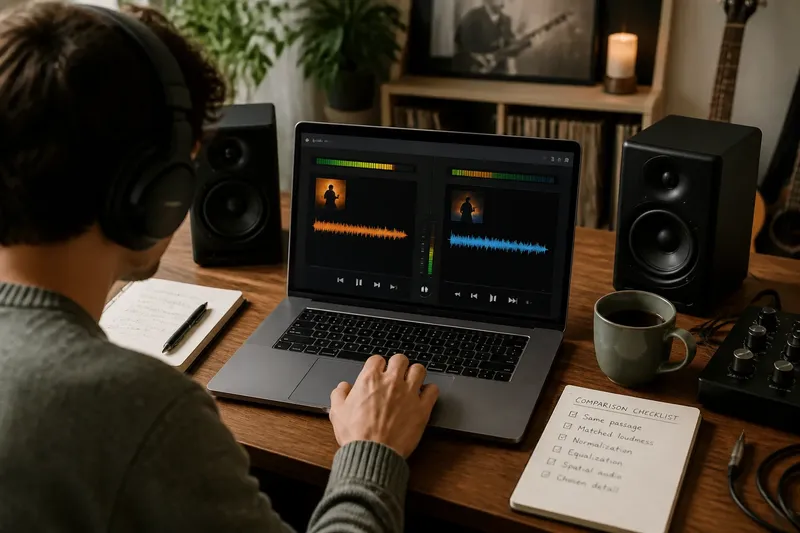
The common mistake in a loudness-matched music comparison is to trust the louder version as the clearer one. Even a modest level difference can make a vocal seem more present or a drum hit more forceful, so the first impression may reflect playback level rather than a difference in the recording.
Loudness and detail
Loudness describes how strong a sound seems; detail refers to audible features such as a singer’s consonants, a cymbal’s decay or a bass line’s movement. Turning up playback raises the level of the signal, but it does not by itself reveal information missing from the mix.
A louder version can still seem more impressive because more of its sound is easy to notice at once. That impression can be mistaken for definition, particularly when a vocal or kick drum feels more forceful.
It is like enlarging a photograph: the features take up more space, but the enlargement alone does not add captured detail. In the same way, playback volume can make existing sounds more noticeable without proving that one recording has better-defined musical parts.
Choose a fair comparison
Compare the same passage in each version, such as a sung line over a steady rhythm or the moment a bass part enters. A familiar section helps because you can attend to a specific feature rather than relying on a vague impression of which version sounds bigger.
Keep the playback device and app settings consistent. Loudness normalisation, equalisation and spatial audio can alter the sound independently of the main volume control, so check whether these features are active before comparing versions.
Choose one detail to judge, such as whether a backing vocal remains audible beneath the lead or whether the cymbal’s decay is distinct. The aim is to compare that feature, not to decide which version is more exciting overall.
Match playback levels
Begin at a comfortable level and adjust the versions until neither seems obviously louder. If your music app offers loudness normalisation, it may reduce large track-to-track differences, but it does not necessarily make two mixes or passages equal in apparent loudness.
For a more deliberate match, use a playback app with level controls or a loudness meter, adjusting only the playback gain rather than changing the recording itself. Treat the meter as a guide: different passages can still seem unlike in loudness because their musical content and dynamics differ.
When comparing two moments within a single track, leave the volume control alone. A quieter verse beside a louder chorus is part of the music’s contrast, not a discrepancy to correct.
Compare the same moments
Replay the same short passage at the matched setting, then listen for the detail you chose. If the distinction is hard to remember, use a track marker or replay control to return to the same point instead of raising the level to force a decision.
Say you have two versions of a song and the first seems clearer because its vocal stands forward. You use your app’s gain control to make the overall playback feel similar, return to the same lyric, and listen for its consonants. If the consonants still stand out, that difference remains audible after the level adjustment; if the impression recedes, loudness may have shaped the initial judgement.
Questions about loudness matching?
Does louder playback reveal hidden instruments?
It may make a quiet part easier to notice, but it does not create musical information. If another sound masks the part, raising the level may not make it distinct.
Should I use headphones or speakers?
Either can work if you use the same setup for both versions. Headphones and speakers present sound differently, so switching between them during a comparison adds another variable.
What does loudness normalisation do?
It adjusts playback levels to reduce large differences in apparent loudness between tracks. Its effect depends on the app and settings, so do not assume it has matched two versions exactly.
How do I know the levels are close enough?
Listen to the same passage and adjust until neither version seems plainly louder, using a meter as an optional guide. If the comparison still feels uncertain, note that uncertainty rather than increasing the level or treating the result as decisive.
Make a useful judgement
Use this quick decision list before drawing a conclusion:
- Check that both versions play the same passage; if they do, compare the chosen detail, but if they do not, reset the marker and replay the matching section.
- Check whether either version sounds plainly louder; if one does, adjust playback gain and listen again, but if neither does, keep the setting steady.
- Check whether loudness normalisation is active; if it differs between versions, align the app setting, but if it is consistent, continue without changing it.
- Check whether equalisation is enabled; if the settings differ, make them consistent, but if they match, leave them alone.
- Check whether spatial audio or another sound effect is active; if it affects only one version, disable it for both, but if it is already consistent, proceed.
- Check whether the selected feature remains audible after matching levels; if it does, describe that specific difference, but if it does not, withhold the claim that the louder version has more detail.
Clarity and preference are separate judgements. You may prefer a louder-sounding master because it feels more immediate, even after matching playback levels; that response is valid, but it does not establish that the recording contains more audible detail.
A loudness-matched music comparison is most useful when you return to the same passage, keep app settings consistent and name the feature you are judging. If the result changes when the apparent level is matched, record that as a clue about your first impression, not as a verdict on the music.